레이블이 ClouDoc인 게시물을 표시합니다. 모든 게시물 표시

2018년 8월 7일 화요일

[Document Centralization - Together with Mr. Yoo] Ep 6. mcloudoc – intuitive collaboration environment


Hello, I am at the Marina Bay Sands Expo Convention Center where Connectech Asia, the Singapore IT exhibition, is being held. I am on the fifth floor of the exhibition hall where our booth is located. Today's topic is mcloudoc's collaboration environment. The recent trend of document management is convenience and security. Employees no longer want a complex document management system, but they prefer a very easy user interface like Dropbox. In addition, the subject of document security is becoming more important for companies to maintain their advanced technologies. Mcloudoc implements the convenience and security of document management on the most familiar platform, Windows Explorer. Well, I will continue in a moment.


Collaboration between internal employees
First, let's look at collaboration between internal employees. To help you understand better, I will explain it without information on security features.
Mcloudoc has personal, team, and shared document drives. This is a source of knowledge for collaboration. You can find the documents you need for collaboration through the content search function. For content search, you can set various search options, and the search results can be retrieved by category. The content search function can be used almost in the same way as Desktop in iOS and Android smartphones.


Scene #2 Team Document Drive
The team document drive is where the most collaboration takes place. It provides collaborative space while reflecting the organization chart in real time.
Normally, a team document drive is created at a company-wide level and the scope of the folder that can be viewed depends on the authority of the person who logged in. Employees of the same team can work together in a shared space and see the results of their work in real time.A team document drive has many team folders. The folder for each team can be managed by the folder manager. Folder managers perform administrative tasks such as setting permission, limiting folder quota settings, and checking access logs.


Scene #3 Share Folder
Folders in a personal document drive as well as a team document drive can be shared with individuals or teams. You can use the share folder function intuitively and access it directly from Windows Explorer. To share a folder, click the folder you want to share first to set up sharing. Settings for Share Folder are available for people or teams, and they also set sharing permissions. The one who received the sharing invitation can instantly view shared folders from their shared document drive. Depending on the sharing permission, read/write/delete permission is granted.

Scene #4 Document Link
Mcloudoc provides document sharing features such as web link copying and link mail. By the way, these two features used to be inconvenient as it moves the user to a download page when clicking. We now offer a new feature called Document Link, which allows you to access documents directly rather than download pages.
First, anyone who wants to share a document will copy a link for the document and paste it into messenger, email, bulletin board, etc., and send it to the other party. The recipient who receives the document link clicks the link to view the document immediately. This feature increases work productivity because it minimizes the number of clicks.

Collaboration with partner companies
Collaboration with partner companies is also very important in document management features. External document exchange servers are used because employees of partner companies are not allowed to access the mcloudoc server. Again, I will explain it without the security functions for better understanding.

Scene # 5 External Document Exchange Service
An internal employee who wants to share a document first creates an external web link for the document, copies it, and pastes it into messenger, email, and so on to send it to others. An employee from the partner company who receives a document link clicks the link to go to the document download page. Now click on the document to view it.
In the meantime, an employee from the partner company uploads the document to the external document exchange server using guest ID. This document is automatically delivered to the mcloudoc server, which allows internal employees to view documents directly from their Windows Explorer drive.
The external document exchange server I explained provides security functions. When the document is exported to the outside, it is in plain text. You need to use an external DRM server to provide outgoing documents in encrypted form. I will provide another video for the external DRM service.
Let me explain the feature called guest ID. This feature is available if you allowed the mcloudoc server to be directly accessible from your partner companies. Please note that in this case, you can also use the document link function I explained before.

Scene # 6 Guest ID
With guest ID, internal employees can deliver documents to the employees in a partner company through a download-only folder. Employees from the partner company can download and use documents via the web, Windows Explorer, or smartphones.
In the meantime, employees from the partner company can forward documents to internal employees via the upload-only folder in guest ID. Internal employees can also view documents received via the web, Windows Explorer, or smartphones.
Collaboration with affiliates
There is a special feature Mcloudoc provides. It also provides the function to exchange documents in a very secure way when there are several affiliates within a group and all of them use mcloudoc.

Scene # 7 Link Download Settings
This is a function for the document link, copying of the external web link, and external link mail. Users who want to view links can strengthen security by enforcing Mcloudoc logins. In addition, it provides a non-repudiation function which prevents the other organizations from accessing the document by limiting emails that receive One Time Passwords to only the domains of affiliates.

Conclusion
Today we looked at mcloudoc's intuitive document collaboration function. If you subscribe to the channel, you'll be notified each time a video is posted. If the content of this video is helpful, please click the like button. Thank you.
So let me ask you a today’s question. Today's question is 'What additional collaboration features do you want mcloudoc to provide?' I look forward to many comments with your creative ideas. Thank you for watching today. I will see you in the next video. Thank you.


※ Resources
- Download a ClouDoc document centralization solution brochure

- Download a mcloudoc document centralization cloud service brochure

- How ClouDoc responds to ransomware
(Chn)http://www.net-id.co.kr/renewal/download/Cloudoc_against_ransomware_chn_20171215.pdf

2018년 6월 20일 수요일

[Document Centralization - Together with Mr. Yoo] Ep 5. mcloudoc – Support of various kinds of network environments


- We will connect you with service product inquiries and consultation related to mcloudoc.


#1. Company network structure - Stand Alone
Shall we look at the first structure? This is a structure that is usually used by customer companies with less than 100 users. There is only one server. Employees access and use the server directly from their PCs.

#2. Company network structure - Active-Passive
Next is a structure that is mainly used by customer companies with 100~500 users. ClouDoc servers are configured in pairs like 2, 4, and 6 servers. Each server has a high availability (HA) solution installed.
Among the servers with high availability solutions installed, the Active servers are used for service. If there is a problem with this Active Server, the Passive Server becomes an Active Server to support the service.

# 3. Company network structure - Active-Active
Next is Active-Active. It is mainly used by customers with over 300 users. At least two servers and even up to tens of servers can be used. In this case, load balancing can be done between servers through L4 switching or Load Balancing Service (LBS). A High Availability (HA) solution is only required for database redundancy. ClouDoc is designed to enable Active-Active services without a separate solution. Because all participating servers are always running, server utilization is much higher than Active-Passive.

 #4. External document exchange server structure
The ClouDoc server is usually only accessible from the Intranet to prevent attacks by external malignant code. You can build an external document exchange server in the DMZ to securely exchange files with the outside. Employees can exchange files with the outside easily with Windows Explorer.

# 5. External DRM server structure
The external DRM server structure is the same as the external document exchange server structure. The only difference is that the file is encrypted when exported. Employees will encrypt the files in Windows Explorer after acquiring an approval from a team leader to send the files to the outside. Those who receive this document will provide non-repudiation and information leakage protection through security functions including One Time Password.

# 6. Access via VPN during business trip or working at home
 If you have traveled outside or need to work at home urgently, you can connect to the ClouDoc server via VPN to work. In some cases, you may connect from outside by using router settings or a virtual desktop program, although we don’t recommend this.

# 7. Access via Proxy server during business trip or working at home
ClouDoc provides connection via Proxy server for both PC and mobile devices. This feature is especially useful for accessing ClouDoc servers on smartphones. Unlike the VPN server, it is very useful because it can access the ClouDoc server from the outside only by setting it up without the need to install a separate program.

#8. Access to external ClouDoc server via Proxy server
ClouDoc's proxy server support was developed for when ClouDoc is outside, not on the Intranet. This feature can be very useful if all corporate Internet connections are only allowed through a proxy server.

# 9. Application to network separation environment
In a network separation environment, ClouDoc performs well through the external document exchange server and data exchange system between networks that exist in a DMZ. A data exchange system between networks is a data movement method used to block the inflow of malicious code between Internet and Intranet.
If you install an external DRM server instead of an external document exchange server in the DMZ, ClouDoc can perform well through the data exchange system between networks.
   
# 10. Collaborative use information leakage prevention collaboration environment
Let’s look at a work environment where you need to work with the partners, but you do not want the partner's products to leak. Partner employees connect to the VPN server. Next, they go through the proxy server and access the ClouDoc server in the Intranet through the data exchange system between networks.
In this environment, all of the deliverables will be stored on the ClouDoc server when the partner employees work.
ClouDoc's security policy is flexible. Depending on the IP band you connect to, you can apply different security policies, even if they are the same user. If a partner employee turns off the PC and reboots, he/she can deactivate the security policy if not connected to ClouDoc. In this way, security policies can be strengthened while ensuring the convenience of partner companies.

※ Resources
- Download a ClouDoc document centralization solution brochure

- Download a mcloudoc document centralization cloud service brochure

- How ClouDoc responds to ransomware


2018년 6월 8일 금요일

[Document Centralization - Together with Mr. Yoo] Ep4. Simple and low cost network separation of mcloudoc against malicious codes!


More Information : www.mcloudoc.com

#1
Hello, I am here in Shenzhen, China next to Hong Kong. The China Information and Telecommunications Expo is being held today, and we are here to promote our products. Today's topic is the network separation function. The network separation function is necessary to prevent malicious code from destroying systems and leaking information from the military, government agencies, communication companies, power plants, etc. Today, I will introduce a function that can prevent the leakage of information by installing the software on your PC though mcloudoc functions. I will see you at the expo in a bit!

#2
The leakage of private information from various institutions has been continuing. As a result, the government does not allow business PCs, which are used for important tasks, to be connected to the Internet. But a work environment without Internet is hard to imagine. Thus, they provide two or more PCs to each person so one is connected to the Internet, and the other is disconnected from the Internet. There are three main types of existing network separation environments. The first is to provide two PCs to one employee. One is connected to the Internet, and the other is blocked. This is called physical network separation. The second one is server-based computing providing a VDI environment. Usually you use the Internet on a physical PC, and you do not use the Internet on a virtual machine PC in VDI. The third one is client-based computing providing a virtual machine environment within the physical PC. The first and second methods are not easy to introduce because of the high introductory cost and the ongoing maintenance costs. And the third method seems to not be well suited to the market due to stability problems.

#3
The reason for the high cost structure of the existing network separation solutions is that at least two PC environments should be provided to all employees, so the network must be designed in a dual structure, and a network data exchange system must be provided. The Incheon Metropolitan City Office of Education did not follow the generalized network separation practices and seriously considered the original purpose of preventing information leakage by malicious codes. The Incheon Metropolitan City Office of Education proposed to us how to block information leakage by malicious code simply by installing software on a PC while using the existing business environment. We quickly implemented that concept and applied it to the Incheon Metropolitan City Office of Education.

#4
First, the administrator divides the IP address into the Intranet and the Internet. Some sites such as banks, National Tax Service, and government agencies may be included as Intranet if necessary. The mcloudoc central drive is only connected to the Intranet mode and not visible in Internet mode. Internet connection is blocked in Intranet mode and Intranet connection is blocked in Internet mode. The exchange of data between the Intranet and the Internet uses a function called Document Export Secure Disk. In Intranet mode, the export of a central document requires approval. Documents saved on the exported disk in the Internet mode can be viewed in the Internet mode. In this way, it provides an excellent network separation environment without changing the network environment and without a network data exchange system. In this environment, even if your PC is infected with malicious code on the Internet in the Internet mode, this malicious code cannot leak information outside.
  
#5
And to show you, I included Google as an Intranet site, on the Internal mode. Let me connect. It is well connected. Now I will go to the Internet mode.
The Central Drive is gone. Let's connect to the Internet site, Facebook. It is well connected. Let's connect to the in-house calendar site. It doesn’t work. And the Document Export Secure Disk shown here can be used to exchange data between Internet and Intranet by using it in both modes.

There are some precautions when an administrator sets up the list of IP bands for Intranet mode and Internet mode. First, this is for Intranet mode. In the Intranet mode, it is necessary to confirm that all the required servers including the DNS server, groupware server, and remote support site are included in the allowed IP band. The list of allowed servers can be set up in comparison with the mcloudoc basic policy to reduce trial and error. And in Intranet mode, there are exceptions that allow multiple Internet sites for specific purposes. If you need to add more sites continuously because there are too many, it is better to affiliate. And if you have a single site but need to use more domains and IP addresses internally, we recommend that you also join it with the Intranet mode.

Then let’s look at the precautions in the Internet mode. In Internet mode, you need a DNS or Windows update server. You need to check if the connection is blocked.
And since you may need some Intranet services on Internet mode, you should also make a careful comparison with the mcloudoc basic policy to set it up and help reduce trial and error.

#6
There are precautions when setting the IP band for Intranet and Internet mode. If you need a DNS server, groupware server, and remote support site in the allowed IP band in Intranet mode in your work, you need to make sure these servers are included. You can reduce the trial and error by setting the list of servers to allow in line with the mcloudoc basic policy that we provide. And, in some cases, employees may request additional servers that are needed in Intranet mode. First, it is recommended not to include them if there will be more of these sites. Second, we recommend that you do not add to the Internet mode if you have one site but need to add a lot of IPs with it, or if you need to add another domain name other than the site name.

#7
These are the precautions for Internet mode, and it’s same for Internet mode. DNS servers and Windows update servers are also required. If it is blocked because it is an Intranet IP address, you will need to allow it. If you use the policy settings provided by mcloudoc even in Internet mode, you can easily set the policy without error.

#8
The Privacy Act stipulates that the Internet must be controlled when using a personal information processing system. NetworkLock can be operated under this condition. NetworkLock can control the use of the Internet in the Intranet mode for personal information processors even when the network is not completely separated between the Intranet and the Internet. And NetworkLock can set different network control policies according to each person's job. For each user, you can assign a server access permission or an internet site access permission differently. However, NetworkLock is not a condition for privacy authentication, it also requires additional security solutions such as firewalls, antivirus, network access control, and DB access control.

#9
The first effect is to prevent malicious code infection, and the second is to prevent information from being leaked by malicious code. Infection with malicious code causes problems such as inconvenience or data loss. However, the leakage of information by malicious code causes a bigger problem. Our precious information is leaked to the enemy, and it brings a terrible result that can be economically or militarily irreversible.

Therefore, information leakage by malicious code is a much bigger problem than malicious code infection. However, a number of local governments requiring network separation are not able to separate networks due to cost problems. NetworkLock provides the most effective way to prevent the leakage of information by this malicious code, and does so at a low cost.

#10

I have just explained NetworkLock, our network separation function. Now, I hope that our information communications network act reflects these latest technologies. If security is applied through differentiating by task, an effective information leak prevention environment can be established.

So here is my question today.
"What are the advantages and disadvantages of NetworkLock as a network separation function?". Please leave a comment below the video.
Please subscribe to mcloudoc today and I’d appreciate it if you click like.
Let me finish up here. See you in the next video.

※ Resources (블로그)
- Download a ClouDoc document centralization solution brochure

- Download a mcloudoc document centralization cloud service brochure

- How ClouDoc responds to ransomware
(Chn)http://www.net-id.co.kr/renewal/download/Cloudoc_against_ransomware_chn_20171215.pdf

2018년 5월 29일 화요일

[eGISEC 2018] mcloudoc Introduction


Hello. This is Sang Leol Yoo. Today, I am at eGISEC, the largest IT security solutions exhibition in Korea. Today, I have a session for my presentation. Ok, I'll see you in a moment.


Now, Sang Leol Yoo, CEO of Netid is going to talk about Cloud service, document centralization.


Hello. This is Sang Leol Yoo from Netid. Thank you for attending my session. This is the order of my presentation.


First, I am going to talk about the background of document centralization cloud service. As you all know, document centralization services are designed to prevent leakage of advanced technologies, prevent leakage of customer information, block Ransomware, and most importantly, improve the work environment through document management. It is used for this purpose.


Netid released a document centralization cloud service. To introduce normal document centralization, the initial cost is high and requires man power to maintain and manage the document centralization system. However, with cloud service, initial investment costs are reduced, services can be managed without the need for staff, and Netid serves a role as a call center. This is the social background in which document centralization cloud service is required.


And in terms of IT environment, telecom companies are concentrating on 5G service. When this 5G service is available, the communication speed of a mobile phone is 20G, not 5G. A speed of 20G is incredibly fast. I feel like “wireless is getting more and more advanced over wired”. In addition, the Korean government announced that they would commercialize the Internet as 10G in 2018. So, the network speed is getting really fast, and as you can see in this slide, there is a graph that shows how the network speed improved in each country, and the network speed is improving very dramatically. The difference in Internet speed between the India I visited five years ago and the India I visited in December was very big.


And another interesting thing is that now it doesn’t even cost 500,000 won to buy a 10TB hard disk on the internet. But in 2000, 1TB did not even exist as a hard disk, and it was in a storage box, which was 100 million won. You can now buy 10TB with 500,000 won.


And even more surprising is the SSD field. Now you can get 4TB SSD for 2 million won on the internet. In February, Samsung Electronics started to produce 30TB SSD. Network speed, storage speed, capacity, and price … all these things make it easier for anyone to access document centralization services.


So why is mcloudoc service better?
The mcloudoc service is based on a solution, ClouDoc. Currently, approximately 300 companies and 53,000 users use ClouDoc. And we have signed more than 50 new customers each year for the last four years. So, ClouDoc's annual revenue growth is close to 40%, and it's a solution that's proven to be effective from customers. It offers cloud service based on this.


We put this know-how into service. In addition to the functionality of ClouDoc, this service provides the ability to back up all documents uploaded to our service for 7 days. Other features include information leakage prevention, Ransomware protection, and document management.


If you look at the configuration of mcloudoc, first, you can use a server that Netid manages itself. In some cases, you can use virtual machines such as Amazon's AWS or Microsoft's Azure. And the backup of the documents is provided by the server we host for 7 days by date backup. We found safe and effective backup methods to provide this service for AWS and Azure as well.


When the documents are saved, we provide basic backup functions, but we plan to provide additional online backup service starting from the second half of 2018.
The online backup service is to keep the backed up document once more in a completely separate place.


Currently, if you purchase mcloudoc, we offer four features. The basic function is to manage the documents of the company such as personal documents, department documents, and shared documents. And we offer Disk Lock, a feature that prevents storing on a PC, additional document security features, and mobile features that you can use with iOS or Android.


For PC save prevention, you must set the policy for prohibiting storage on the PC for each application. In the past, document encryption solutions were developed for each program and provided various encryption functions. Without any further development, we already have policy settings for many of these programs, so we can apply them right away. If you need to set up a policy for a program that is not on this list, we can usually provide you with policy settings in a half day, one to two days at the latest.
This is an area where we can respond differently than with existing encryption solutions.


What effects can we expect by introducing mcloudoc? First, the initial investment is reduced because you do not need to have a separate computer room or a separate server. In addition, the cost for manpower to manage the server and computer room, and the staff to solve various problems when employees call with them, will be reduced.
It also provides an effective work environment through prevention of information leakage, blocking of Ransomware, and document management, which is the purpose of document centralization.


To summarize what I've said so far, the mcloudoc service is available for a minimum 5 users. In the past, a customer with 10 users requested the following via phone, "The introduction fee is too high. Can Netid provide their own web hosting?" But it was not available. Now it’s possible. 5 users can use the document centralization cloud service.
So in the first month, there is an engineer fee and monthly fee and starting the next month, there is only a monthly fee.
The environment became very easy for making decisions and using the service.


Once consulting with your company now or after going back, you don’t even need to worry much about things like "I like this cloud service. I need it but what should I do?”. You only need to know how many people will use it. You just need to think about "document centralization service provides 50GB per person, but do I need more capacity?”
In the second half of 2018, you have to think about one more thing. "Do I need an online backup service?" That’s all. It has eliminated all your worries.
If you have any questions, please contact us at the phone number and e-mail address here. We will be happy to help you.


In this exhibition, we are organizing an event for new customers who are signing up for mcloudoc. You can participate one of these two events: "1 free user for 5 users" and "1 month free for 6 months". We plan to complete the mcloudoc site reorganization in March and do the same event on the web.


We also created a YouTube channel. A few days ago, I saw the article, it said that Korean users have doubled their usage on YouTube over than Naver. That shows that our customers actually want to check things through video before purchase. ClouDoc has entered the document centralization market at comparatively early stage. It is the oldest existing document centralization solution.

I plan to upload a video every month to explain what document centralization is and how to approach it in an easy and systematic way. Document centralization solutions actually originated from Korea.

That's why we created this channel to promote the concept of document centralization to our international customers by providing subtitles in four languages.

I’ve posted two videos now. We are sending you Americano coupons during this exhibition, so please participate by searching for mcloudoc on YouTube, subscribe to our channel, select any video, click ‘I like this’! and leave a comment.


This iss an actual introduction case of 10 users. There are only 10 employees, but when the owner made this company, he was confident about his technology. So it should not be leaked by employees or partners. That was the reason they introduced this. It was an easy decision.
It took less than a month after they asked about the product. Because it does not cost a lot. Customers who have used this document centralization product often purchase for all of their employees after a year or two. Those who are ahead of us are interested in document centralization and security.


I think mcloudoc is a very good product for a private hospital as well. I was surprised when I visited a large hospital. Where do you think CT and X-ray images of patients are stored?
In the vault? They were just saved in a Windows file server. I said that SSD 4TB is 2 million won nowadays, if there is any employee with malicious intentions, that person can copy all of the patients' images and store them in there. I thought that if it’s like this in a large university, then how bad it would be in a small hospital? So I think it would be better to use a cloud service, mcloudoc, in hospitals, travel agencies, and academies where the size is small but there is a lot of customer information.


I talked about a small-scale manufacturer case as the first real customer case. And for large companies, purchasing a solution is extremely complex. They have to plan, write drafts, get cooperation from other departments, receive approval and such ... it's too difficult.

However, if you use the cloud service, decision making is easy, for example, the head of the department can decide the budget for the department without approval from the president.


More Information: [mcloudoc homepage]

※ Resources 
- Download a ClouDoc document centralization solution brochure

- Download a mcloudoc document centralization cloud service brochure

2016년 8월 10일 수요일

[ClouDoc] Demonstration of ClouDoc ransomware preemptive blocking


There is a proliferation of ransomware that encrypts files saved on Windows PCs and extorts money from users in return for a decryption key.

Looking at the many types of ransomware you can become infected with and the many ways you can become infected, let’s take a closer look at the differentiated response plan to ransomware provided by ClouDoc.

ClouDoc provides preemptive blocking of ransomware and post-exposure reponse options.

Ransomware infection routes – running ordinary programs, based on web browsers, running DLL extensions. ClouDoc protects user documents safely from all types of ransomware infection.

Follow up response to ransomware.
Even safer when used together with the ClouDoc Backup Appliance.

2016년 8월 7일 일요일

[ClouDoc] Document centralization based document security Smart work environment construction

(ClouDoc Introduction video)


Many companies have recently faced threats to their documents in the form of ransomware and malicious code as well as data leakage from former and current employees. In spite of this, most companies still need to take extract steps to safeguard their document assets. Only 10% of work-related documents are stored centrally on servers.


Of course, they are a multitude of traditional solutions in the security market including DRM, DLP, EDMS and others. Companies select solutions from these products based on their needs.

However, these solutions are often plagued by compatibility problems, limited functionality, inefficient management tools, and high costs. Is there an innovative product in the security market that can make up for the problems inherent in these traditional solutions?


ClouDoc combines DRM, DLP, EDMS, and network separation functionality in one integrated "One Agent" environment.

ClouDoc features a variety of security functions for the safe management of documents. On top of document management functions, the product can also restrict online/offline media such as hard disks, USBs, CD-ROMs, Bluetooth, and online attachments. It can also restrict printing, screen captures, clipboard use, and malicious code.


As ClouDoc includes a user interface based on Windows Explorer for user convenience, changes in the user environment are minimized to induce users to naturally save documents centrally.

Depending on the objective of use, ClouDoc can provide personal, team, and shared document drives. If a user creates and saves a document, ClouDoc policies can be made to block local storage on the C: and D: drives and enforce saving the document centrally.


Centrally-saved documents may be saved in folder structures that allow for collaboration, enhancing productivity. The team document drive, in particular, manages employee work documents and may be used as a space for collaboration between team members and employees. The scope of access permissions depends on folder permissions for users in department document folders


ClouDoc provides a convenient work environment for document management and collaboration.

ClouDoc's version management functions stores previous versions of documents just by saving a document.

As a result, if a document is accidentally overwritten or saved improperly leading to document loss, it is possible to restore a previous version.

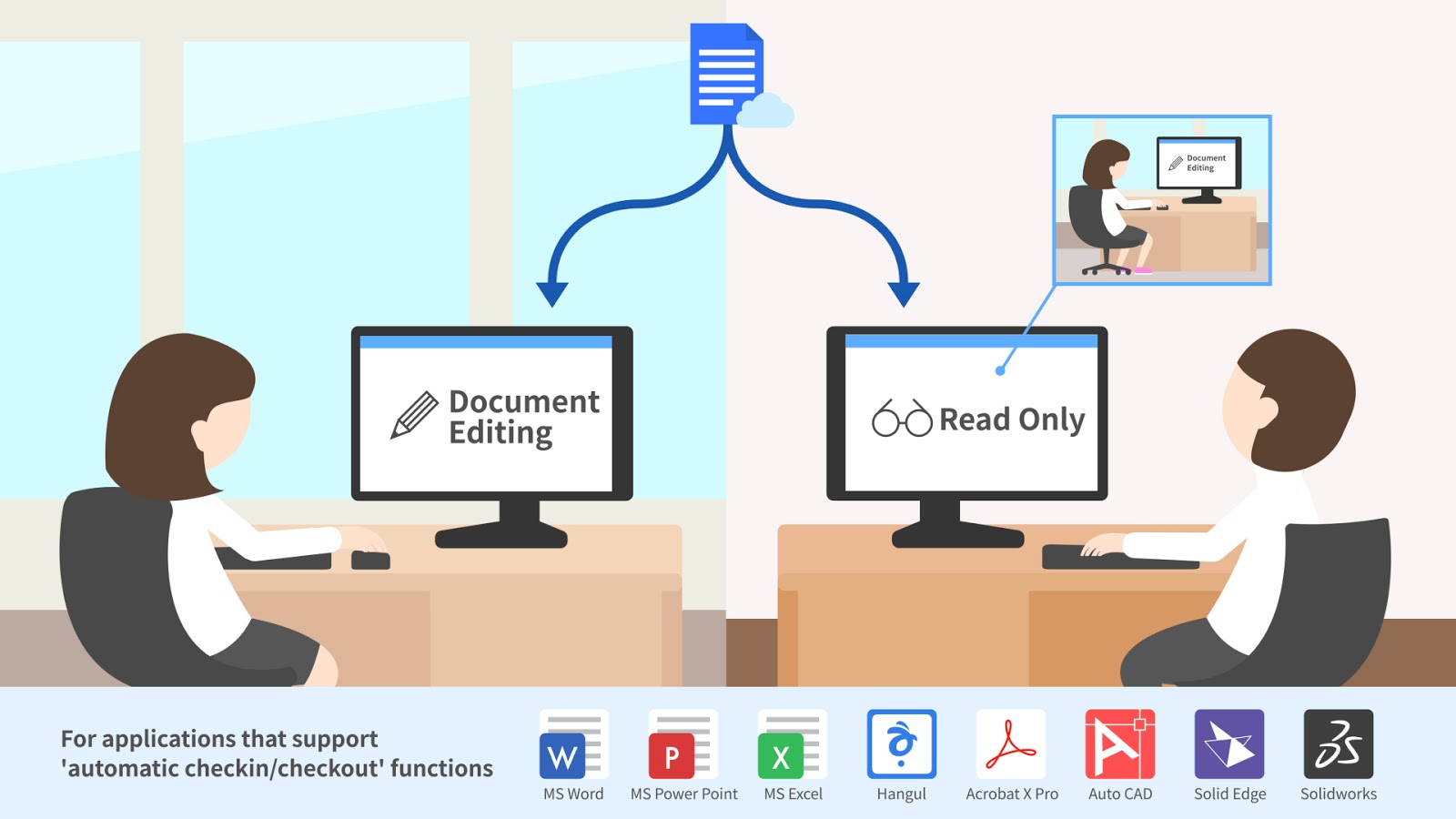
Additionally, ClouDoc provides an automatic check-in/check-out feature to prevent duplicate document saving when working collaboratively.

When this occurs, it is possible to verify the user currently using the file by checking this file's properties windows.

If employees wish to send documents to other employees, they may use a document link without needing to attach a separate file.

If a file from the document folder needs to be attached when sending email, approval must be received from a designated approver first.


Solution against ransomware.
Cloudoc blocks ransomware infection pathways such as web browsers, PDF files, and Windows Explorer as well as general ransomware.

To ensure a follow-up response, use in combination with ClouDoc backup applications for even more security.


Based on exclusive technology, ClouDoc has been supplying solutions to companies in all sectors including the public sector, manufacturing, distribution, pharmaceuticals, IT, medical services, marketing, energy, and the chemical industry. Moreover, the solution is being expanded to cover all industry secotrs as it allows protection for all document types.

ClouDoc protects its customers' precious documents in a One Agent environment that allows for convenient management and use.


2015년 8월 13일 목요일

Net-ID releases ClouDoc backup application without limit on number of servers or backup capacity


 Net-ID releases ClouDoc backup application without limit on number of servers or backup capacity

Cloudoc provides superior document security by preventing ransom ware in addition to features such as snapshot backups, incremental backups, backup schedule management, performance and backup status monitoring.

Net-ID, a leading document centralization solutions provider, has announced the release of a backup application based on the company’s data knowledge management and security technology in response to ransom ware, an issue that has troubled not only corporations but even individuals.


 Net-ID’s ClouDoc Backup Appliance consists of backup software, server hardware, disk storage and all the components necessary in an integrated form. Managers can easily and quickly restore data in the event of damaged documents because of malicious data management, the intrusion of ransom ware or malicious code. In this way, work continuity can be maintained while providing an environment in which disaster preparedness is always available..


cloudoc backup


In order to allow easy data restoration by managers of damaged data due to unfortunate accidents, ClouDoc Backup Appliance is a backup solution that maintains an identical folder structure on a daily basis, while adding capacity only for newly created or modified data. In addition, the product provides convenient management through backup status and device performance monitoring. A stable backup system can be operated with a built-in firewall and control functions.


ClouDoc Backup Appliance is differentiated from existing backup solutions, in particular, by its lack of restriction on the number of servers or the file capacity of the data being targeted for backup. Accordingly, this backup product looks set to provide a very price-conscious and effective solution for customers with large-capacity files on many different devices such as ClouDoc document centralization servers, as well as other file or web servers targeted for backup.


2015년 2월 22일 일요일

Security & work productivity improvement with Cloud storage based network separation

Security & work productivity improvement with

Cloud storage based network separation


Realization of network separation environment with NetID ‘ClouDoc’…

Enhanced work efficiency by supporting Smartwork

(Written by : Reporter Seon Ae Kim / Photo: Reporter Goo Ryong Kim)
Incheon Metropolitan City Office of Education


Incheon Metropolitan City Office of Education introduced network separation environment as one of the ways of supporting safe, happy schools. That is to establish safe education environment by protecting student personal information and important information from intellectual cyber attack. Especially Incheon Metropolitan City Office of Education could enhance user convenience and security strengthening effect through white list based internet interruption policy.


Review on logical network separation for student personal information

Incheon Metropolitan City Office of Education needed a method to manage their work systematically and prevent information leakage as outsourced personnel were changing frequently. They had reviewed physical network separation to manage outsourced personnel PC. But they decided to construct logical network separation in need of protection for student personal information and internal information about education and administration stored in PC or the system.


After reviewing physical network separation and SBC-BCB type logical network separation technologies, Incheon Metropolitan City Office of Education concluded that logical network separation was suitable to the environment of the Office of Education. Afterwards, although we reviewed the logical network separation solution from various angles, we could not find a solution suitable to the requirements of the Incheon Office of Education.

Inchon Office of Education wanted network separation environment adopting a Cloud storage concept. They desired to realize the environment to access information safely for work execution at the outside as well as to protect important information from hacking. Necessary was a method to store data in the central storage and to connect with the internet when accessing the data.


Application of white list based internet interruption policy


Incheon Office of Education searched for the system optimized for the Office of Education work with the assembly of Electronic Document Management System (ECM), Document Centralization, and Desk Top Virtualization (VDI). As the Incheon Office of Education had already been equipped with work management system and electronic payment system, they mainly reviewed the products enabling to realize white list based internet contact permission/interruption policy.

As ECM or document centralization products supplied in the country had no internet network separation function, and VDI was to separate internet and work network using a virtual PC, they did not match with their demand to permit internet connection only when necessary. It was likely that a CBC type network separation solution took considerable time to convert to work network and internet network in the actual work environment and caused delay of work productivity.
Incheon Office of Education decided that ‘NetworkLock’ function provided by NetID ‘ClouDoc’ could meet all network separation requirements. NetworkLock is normally away from internet connection and waiting for work network connection. When contacting the internet site permitted by the manager, NetworkLock functions to connect to the internet.


Officer Kyo Kwon Jin made clear that, “NetworkLock function was a core function to help realized optimized network separation environment for Incheon Office of Education, requiring collaboration through internet connection with specific government organizations related. While we maintained almost similar environment to existing work using a ClouDoc NetworkLock function, we could accomplish network separation reformation.”


Supports Smartwork environment as well as security

 
Incheon Office of Education substantially obtained the effect of network separation during reorganization after the inauguration of new superintendent of education. As important information was stored in individual staff’s PCs in the existing environment and such information was not managed properly, reorganization would have required considerable time and efforts to rearrange information management system. However, as all important information was stored in the central server under the network separation project, when access policy of authority to approach the relevant information was changed, we could proceed with our work safely and conveniently even in the renewed organization environment.

 
Also, as we did not need to deliver data by email or USB, and the information accessible within authority could be approached whenever and wherever, collaboration with external organizations or work outside of the Office of Education could be done easily. Further, even in case of faulty PCs in use, as we can work at another PC without PC backup, it is also advantageous to ensure work continuity.

 
Officer Kyo Kwon Jin explained that, “AS network separation has proceeded based on Cloud storage, and we could access necessary information whenever and wherever only with our own accounts, we could realize Smartwork environment. As an auditor or school inspector, who goes on frequent business trip to educational institutions, can do his task for himself at a school site, and he can finish his task with reduction in travel time, productivity and job satisfaction have increased.”
 
“Incheon Office of Education killed two rabbits-productivity and security-with the environment optimized network separation.”


Why did they proceed with the network separation project?

They needed a method to protect student personal information stored at the Incheon Office of Education. Besides, systematic management and protection method for important administration documents, which should not be released to outside illegally, were required. In the meantime, another necessity was to protect intranet mode from outsourced personnel stationed inside the Office of Education for IT system development, maintenance and repair.
 

How to make up Cloud storage based network separation environment.

 
Important information necessary for work was stored at the secure, safe central storage, and, according to authority access control policy, authorized person only could contact the information to proceed with the work. Basic work had to be done only in work network and normally internet contact was interrupted. When applicable information has to be transmitted to an outside organization, internet contact was possible only to the site where white list based security policy has already been permitted.


What is the effect of ClouDoc installation?

 
As user inconvenience increases under general network separation environments, field claims tend to congest. As network separation using ClouDoc allowed work process under the environment almost same as the existing work and internet contact was made rapidly, security was reinforced without affecting productivity. As it provides network separation environment based on Cloud storage, it is also effective in realizing Smartwork. As you can access your desired information using any PC anytime and anywhere and also an audit or superintendent of school with a lot of external business can immediately work outside, job satisfaction goes up.