레이블이 Protect CAD인 게시물을 표시합니다. 모든 게시물 표시

2016년 8월 7일 일요일

[ClouDoc] Document centralization based document security Smart work environment construction

(ClouDoc Introduction video)


Many companies have recently faced threats to their documents in the form of ransomware and malicious code as well as data leakage from former and current employees. In spite of this, most companies still need to take extract steps to safeguard their document assets. Only 10% of work-related documents are stored centrally on servers.


Of course, they are a multitude of traditional solutions in the security market including DRM, DLP, EDMS and others. Companies select solutions from these products based on their needs.

However, these solutions are often plagued by compatibility problems, limited functionality, inefficient management tools, and high costs. Is there an innovative product in the security market that can make up for the problems inherent in these traditional solutions?


ClouDoc combines DRM, DLP, EDMS, and network separation functionality in one integrated "One Agent" environment.

ClouDoc features a variety of security functions for the safe management of documents. On top of document management functions, the product can also restrict online/offline media such as hard disks, USBs, CD-ROMs, Bluetooth, and online attachments. It can also restrict printing, screen captures, clipboard use, and malicious code.


As ClouDoc includes a user interface based on Windows Explorer for user convenience, changes in the user environment are minimized to induce users to naturally save documents centrally.

Depending on the objective of use, ClouDoc can provide personal, team, and shared document drives. If a user creates and saves a document, ClouDoc policies can be made to block local storage on the C: and D: drives and enforce saving the document centrally.


Centrally-saved documents may be saved in folder structures that allow for collaboration, enhancing productivity. The team document drive, in particular, manages employee work documents and may be used as a space for collaboration between team members and employees. The scope of access permissions depends on folder permissions for users in department document folders


ClouDoc provides a convenient work environment for document management and collaboration.

ClouDoc's version management functions stores previous versions of documents just by saving a document.

As a result, if a document is accidentally overwritten or saved improperly leading to document loss, it is possible to restore a previous version.

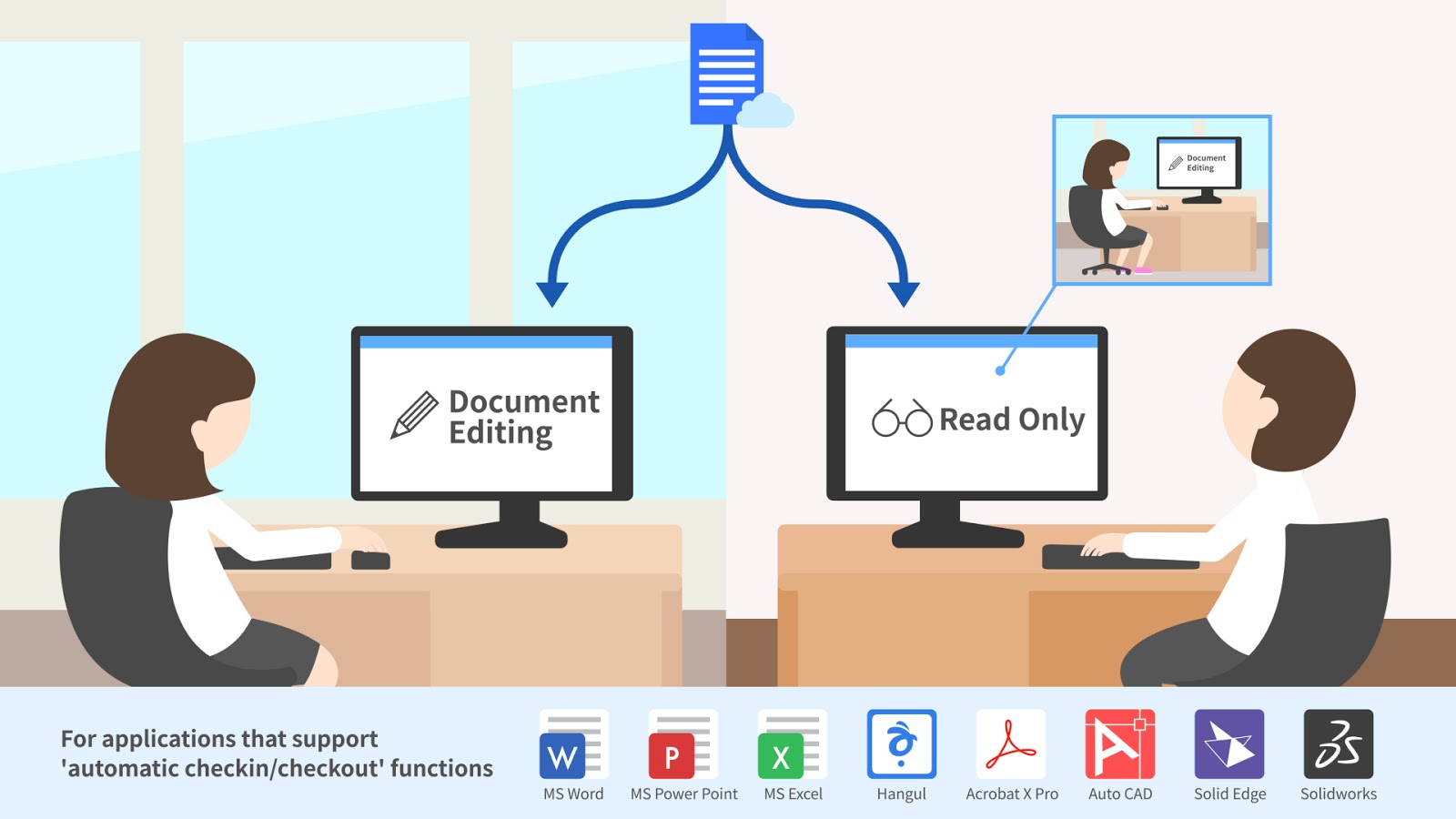
Additionally, ClouDoc provides an automatic check-in/check-out feature to prevent duplicate document saving when working collaboratively.

When this occurs, it is possible to verify the user currently using the file by checking this file's properties windows.

If employees wish to send documents to other employees, they may use a document link without needing to attach a separate file.

If a file from the document folder needs to be attached when sending email, approval must be received from a designated approver first.


Solution against ransomware.
Cloudoc blocks ransomware infection pathways such as web browsers, PDF files, and Windows Explorer as well as general ransomware.

To ensure a follow-up response, use in combination with ClouDoc backup applications for even more security.


Based on exclusive technology, ClouDoc has been supplying solutions to companies in all sectors including the public sector, manufacturing, distribution, pharmaceuticals, IT, medical services, marketing, energy, and the chemical industry. Moreover, the solution is being expanded to cover all industry secotrs as it allows protection for all document types.

ClouDoc protects its customers' precious documents in a One Agent environment that allows for convenient management and use.


2015년 8월 13일 목요일

Net-ID releases ClouDoc backup application without limit on number of servers or backup capacity


 Net-ID releases ClouDoc backup application without limit on number of servers or backup capacity

Cloudoc provides superior document security by preventing ransom ware in addition to features such as snapshot backups, incremental backups, backup schedule management, performance and backup status monitoring.

Net-ID, a leading document centralization solutions provider, has announced the release of a backup application based on the company’s data knowledge management and security technology in response to ransom ware, an issue that has troubled not only corporations but even individuals.


 Net-ID’s ClouDoc Backup Appliance consists of backup software, server hardware, disk storage and all the components necessary in an integrated form. Managers can easily and quickly restore data in the event of damaged documents because of malicious data management, the intrusion of ransom ware or malicious code. In this way, work continuity can be maintained while providing an environment in which disaster preparedness is always available..


cloudoc backup


In order to allow easy data restoration by managers of damaged data due to unfortunate accidents, ClouDoc Backup Appliance is a backup solution that maintains an identical folder structure on a daily basis, while adding capacity only for newly created or modified data. In addition, the product provides convenient management through backup status and device performance monitoring. A stable backup system can be operated with a built-in firewall and control functions.


ClouDoc Backup Appliance is differentiated from existing backup solutions, in particular, by its lack of restriction on the number of servers or the file capacity of the data being targeted for backup. Accordingly, this backup product looks set to provide a very price-conscious and effective solution for customers with large-capacity files on many different devices such as ClouDoc document centralization servers, as well as other file or web servers targeted for backup.


2014년 9월 2일 화요일

ClouDoc frees your network from copy & move of large amount of data!

ClouDoc frees your network from copy & move of large amount of data!


Document Copy and Move at Microsoft Windows FileServer


In general users of Windows FileServer utilizes one of the following methods for connection to Window Explorer. 
  
 The above methods are commonly used for Windows FileServer. In this case, if a file or folder is copied or moved, all applicable files come down to PC and up again to the server, requiring network much.


Document Copy and Move at ClouDoc
 

To limit such use of network, ClouDoc offers Copy or Move methods in the server. User or administrator may need to copy or move files in at least some MBs or as many as some TBs, In this case this function will not allow the company network to be loaded at all.


<Picture> Network traffic state during document copy and move in the server


What kind of method do you want?


Except for the above functions, ClouDoc includes the following diverse functions, which is not provided by the existing file server.
 
  
  • Folders in the private document box or team document box in the server are shared by other persons or teams 
  • Files in the private document box or team document box in the server are shared by link mail or link itself, and the usage is limited by code, period, or time.
  • Search function on documents in the server is provided in connection with a special search engine.
  •  Automatic version management function is provided for documents stored in the server.
 
Besides, ClouDoc will provide intelligent document management function additionally instead of providing a simple file server.


2014년 8월 26일 화요일

ClouDoc supports automatic check-out/check-in. Just double click your document!

ClouDoc supports automatic check-out/check-in. Just double click your document!


How much have you been inconvenient ?

 Conventional document management solution keeps documents in database. It provides functions like meta search, full text search, version management, check-in/check-out, Also, forming tremendous demand markets in the world.

  
Meanwhile, IT environment, with the advent of Cloud service, mobile environment, and diverse
Visualization techniques, is expecting new functions of document management solution itself.


One of them is check-in/Check-out/ function. Check-out means to lock the network for correcting the document stored in DB and download the document into your PC for correction work. Reversely, the corrected document should be registered again in DB for check-in.
 
As check-in/check-out function requires a user to take multi-level procedures, and sometimes to get an approval of his senior, its performance is cumbersome. If cumbersome, what would you do?.

 
Perhaps, it is natural these days that such cumbersome be disregarded by employees.
 

Automatic check-in/check-out of ClouDoc helps you.


ClouDoc allows automatic performance of check-out/check-in fuction. Only double clicks on the document in the central document drive provide same effect as check-out. If a user who has opened the first document has Write authority on the document, Users after the first would open the document as read only. If the user who completed document correction stores the document and finishes the application, UnLock function equal to check-in function is automatically performed.
 

Now, users do not need to perform documentation through multi-level procedures any more. Your employees would do their own business, without noticing their performances of other procedures, except for documentation in a very transparent way.

This automatic check-out/check-in function is applied to CAD programs like AutoCAD,SolidEdge and SolidWorks as well as Office program. Besides, users can identify who has the authority to write on the current document through Attribute window of the file.
  
 
<Picture> Application to support automatic check-in/check-out
 

Only advance technology can enhance corporate productivity.

Naturally, employees would not be afraid of the storage of document in the center and correction.

Tremendous amount of documents and drawings gathered in the center would be properties for healthy and growing business. Advanced technology will be business competitiveness.


2014년 4월 25일 금요일

Security Architecture for document centralization solution & information leak prevention.

English Blog :    http://mycloudoc.blogspot.kr/
Japanese Blog :  http://blogs.yahoo.co.jp/cloudoc_netid
email :  netid@net-id.co.kr   

ClouDoc, Protect CAD files, Protect documents from malicious codes


Recent information leak accidents are mainly caused by people rather than by malignant codes


Personal information leaks were largely reported in January 2014, and presidents of each relevant companies were resigned.


*  KB Kukmin Card : leaks of 53 million
*  Lotte Card : leaks of 26 million
*  NH Nonghyeop Card : leaks of 25 million


In the meantime, personal information leak accident of Shinhan Card was reported additionally in April.


Besides, many information leak accidents were reported. Among them the information leak accident only in the Agency for Defense Development was caused by a malignant code, while the rest by people. ClouDoc, equipped with information leak preventing measures by people as well as by malignant codes, is the Document Centralization Solution, 


ClouDoc - ClouDoc Security Architecture
<Figure> ClouDoc Security Architecture


Document Centralization Solution which uses PC disk locking


ClouDoc provides disk IO control(disk locking) functions for USB drive, CD/DVD drive, and network drive, as well as local disk for the designated applications. Especially, unlike other products, disk IO control is realized by using a characteristic value of application instead of application name or file name.

 ClouDoc - Comparison of disk IO control(disk locking) methods
<Table> Comparison of disk IO control(disk locking) methods


‘Information leak prevention by malignant code’ by separating Networks


ClouDoc’s NetworkLock module provides Network separation function without additional hardware nor network infrastructure change. For information leak prevention, users are controlled to the minimum in the intranet or internet modes.


ClouDoc - User environment control under ClouDoc NetworkLock environment

<Figure> User environment control under ClouDoc NetworkLock environment


Only approved documents can be provided to partners.


ClouDoc provides the safe approval system for document exchange with partners. Only the approved documents can be delivered to outside, and the documents from outside are automatically moved to the applicable user drive for use.


Offer embedded approval system to export document
Documents in the central location can be exported after approval. Approved documents can be attached to 'email, messenger, or bulletin boards'. And they can be stored in the security drive area in local disk for outside work.


ClouDoc - Two kinds of document exports
 <Table> Two kinds of document exports


Suggestion of the Knowledge management roadmap in the future safe security environment


ClouDoc is not just a solution to reinforce security environment only.
Customers adopting ClouDoc can gather documents in central server naturally as well as reinforce security system. Almost 100% task documents in staff’s PCs are gathered into the corporate owned storage.


ClouDoc strives to provide Knowledge management environment so that tremendous amount of documents accumulated in center can be used effectively for corporate work environment. And it will provide document management function suitable for the new internet era through continuous function update in the future. 


2014년 3월 16일 일요일

Video : ClouDoc! To protect documents of your company.

HomePage : http://www.net-id.co.kr
Facebook : https://www.facebook.com/cloudoc.netid
Youtube : http://www.youtube.com/coreajazz2

linkedin : http://www.linkedin.com/pub/sang-yoo/22/a27/747
SlideShare : http://www.slideshare.net/coreajazz
Japanese Blog : http://blogs.yahoo.co.jp/cloudoc_netid
email : netid@net-id.co.kr  


Why we should protect documents of our company?

Nowadays, the most important property of corporation is electronic document rather than real estate and machinery. However, the market research firm Gartner published that 90 percent of corporate documents exists on employee PC and the remaining 10 per cent are stored on the server. The Small Business Administration also published that more than 70% criminals of Information Disclosure are current & former employees or partners.


To resolve the problem, files are saved encrypted and the hard disk of retired is returned to company. However, some wiped hard drive can prevent the Information Disclosure? File encryption method also hinder the performance of your PC or can protect only the specified version of the program data. So most of application data can't be protected.

Why ClouDoc?

The Product enables you to use Personal Document Drives and Team Document Drives saved in the central server as if you would with the Local Drive in your PC. By the corresponding application, the product disables you to save a document in the Local Drive, but enables you to save it in the central server.

The Product supports various user interfaces: it can be used not only on Windows Explorer, Java Explorer and Web Browser, but also on Smart phone and Tablet. This means that users in any environment (Windows, Linux, Mac, mobile etc) are enabled to use the Central Document Drive

You can view central documents safely in mobile (smart phone, Tablet PC etc) environments. If the mobile device is lost by accident, you can track the document location and delete it remotely. Documents saved in the mobile device cannot be leaked out since they are encrypted..

When you edit an Office document stored in the Central Document Drive, the old version of Office document is automatically kept in the Drive. The old version kept in the Personal or Team Document Drive can be recovered as and when required.

Many organizations control USB memory, email, Messenger, printer and etc to prevent unauthorized export of documents saved in PCs. But the hard disk of PC can be the major source of data leak and therefore requires to be strictly controlled.

Disklock is the world best module for 'document-save control', which is developed based on the file system driver technology of NETID. Unlike others that control documents by name of application, DiskLock uses internal information of the applications for better security.

ClouDoc is ready for use!

The Product is rapidly growing at the rate of 168% on average each year since 2009. Global leading organizations like Samsung Engineering, LG Electronics, Tokyo Electron Korea, SKT, Lotte, Samsung Card, Seoul City, OCI etc use ClouDoc for centralization of their mission critical documents.

"The product preventing data leak for personal use by the central document management just through the policy setup at the center" We recommend ClouDoc for document centralization and anti-data leak.

HomePage : http://www.net-id.co.kr
Facebook : https://www.facebook.com/cloudoc.netid
Youtube : http://www.youtube.com/coreajazz2

linkedin : http://www.linkedin.com/pub/sang-yoo/22/a27/747
SlideShare : http://www.slideshare.net/coreajazz
Japanese Blog : http://blogs.yahoo.co.jp/cloudoc_netid
email : netid@net-id.co.kr